
 China (Simplified Chinese)
  Brazil (Portuguese)
  France (Central Africa and Europe - French)
  Spain (Latin America and Europe - Spanish)
  Germany (German)
  Saudi Arabia (North of Africa and Middle East - Arabic)
At C-Servers, support is handled through a mixture of a first-touch AI approach, and human support after that (on supported plans above 12 USD/year and/or 1GB RAM - check this article).
This is essential due to the fact that we've seen many things that today are a ticket, accross all hosting providers, are actually very common issues accross several services with equal straightforward solutions for them - and they don't need a ticket to be opened.
It's faster for everyone: for the customer that has an issue, and for the provider that gets an issue fixed faster.
How does it work?
At first, you need to access our Live Chat. That is possible to be done either at our Support website, or directly at the WebStore through the "chat icon" blue balloon at the lower left corner of your screen.
From there, you will recieve a greeting message, usually from Michael Williams, our AI assistant: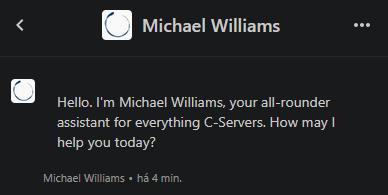
And from there, you'll be able to provide your issue on natural language, just like you'd speak with a customer representative on the phone or at any physical store. After sending your message, allow for up to 15 seconds for a response to appear.
Michael Williams will then attempt to fix your issue by doing several questions and providing you with the necessary solutions for your issue. These are not only direct solutions from our public Knowledge Base, but they're also very relevant internal information that is not available elsehwere on the website, and only Michael knows. Just like any regular support assistant would.
Do not bother trying to force getting to a human assistant in any way - the support system is deliberately built to reject all incorrect attempts, regardless of their number or type. Offending the assistant will also never work. The same will occur if, regardless of what you've stated on your response, Michael knows that has given you a correct answer, in which case the assistant will outright refuse to transfer to a human support agent. Therefore, be honest with Michael, and he'll in turn be honest with your need and naturally provide you with all the necessary help.
Act just like you would with any regular human support agent.
And what happens if he can't fix the issue?
He'll actually ask you if you have any further issues first, giving you a chance to actually benefit from the fast responses of Michael Williams and his existing knowledge. You may have a different issue or topic that hasn't been treated at the time and that can be answered from there, saving you some time on the process. There are more than 150 topics Michael has answers for and the number grows every week.
If you don't have any other issues than the ones you've mentioned, and Michael wasn't able to fix that, you just state exactly that, on natural language - and state that since the issue still exists, you wish to escalate via ticket to the support.
Michael Williams will then provide you with the now pre-validated access to the ticketing section. There, you can write a ticket as you'd normally would, with as much context as possible, and after submitting a ticket a human representative will get back to you as soon as possible and follow-up or escalate whenever necessary.
How to operate with the customer[at]c-servers.co.uk e-mail?
For further convenience, once a ticket is opened, you do not need to continuously access the C-Servers Support website. You can merely reply from the same registered e-mail at the C-Servers Support platform as the one you've opened your Support ticket from, and it will register your responses and post them to the existing ticket automatically, allowing you to use your regular e-mail client conveniently. That's the primary reason that e-mail exists - for convenience on handling existing tickets.
The e-mail is therefore only valid for already opened tickets at the platform - regular customers can't automatically open entirely new tickets by sending an e-mail directly to the Customer support e-mail (and therefore bypassing the Live Chat), since February 2026. They always have to go through the Live Chat first. This is deliberately done in order to organize our Support.
There are no exceptions to this rule - regardless of the circumstances.
The Customer e-mail, therefore, also partially works as a No Reply e-mail in the sense that, if you attempt to send an e-mail out of the blue to that e-mail, you will recieve an automated message. This e-mail is not humanly supervised, it's merely a bridge between platforms, made for the convenience of existing customers with opened tickets.
Every time you send an e-mail to the Customer support e-mail regarding an already opened ticket: you will recieve an automatic confirmation that we will answer back to you, and then a second e-mail will be recieved with the corresponding answers from our human Support team.
If you've attempted to send an e-mail and didn't open a ticket: you will recieve a single e-mail with an automated message remembering you that you need to go through the Live Chat first. You'll never recieve a second e-mail with a human response, and any further messages you send will have the same exact response as that first e-mail - and are recieved immediately after sending, which is your call to essentially realize that you still didn't open a ticket through the necessary process, and to do it accordingly.
Due to technical limitations, the default automated e-mail sent is the same for both scenarios, always in English. Obviously, you will know if you have opened a ticket through the Live Chat and the Ticketing website platform or not, so you'll know beforehand which part of the text applies to you.
For refunds
Refunds have a special funnel and are never supported via ticket since January 1st, 2026. They are automatically handled on a special process exclusively through the Live Chat that will provide you a special e-mail to request a refund for, including all the necessary instructions.
That is the only medium where we accept refund requests, so don't try to send them through any other ways.
All refunds go mandatorily through the Live Chat and in English. If it is not your native language, use a translator like DeepL.

Centerfield Ltd
14/2E Docklands Business Centre
10-16 Tiller Road, E14 8PX, London - United Kingdom
Mon-Sat: Regular Support 24h / Specialized 10-22h GMT
customer@c-servers.co.uk
 Protected with a 256Bit SSL certificate