In a very simple way, and also a industry-first at C-Servers for server modules: directly at your Client Area.
Simple, effective and clear
Take a look at this section, present on the "Manage" section for your VPS: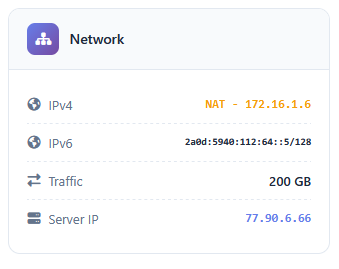
The "Server IP" is the relevant information for you. This is the IP you shall point to/from in order to use NAT IPv4. Simply check your allocated ports - which is done exclusively at the VirtPortal (virtportal.cfld.uk) and on your account - and use your desired software to point to/from them automatically.
If I want, can I send a ticket to associate the VPS to a given port range?
C-Servers has decided not to provide any type of support to this NAT system on VirtFusion-based VPSes, as a commercial decision. All functions are available directly at the VirtPortal and all data is provided to you so that you can use NAT IPv4 autonomously on the VirtPortal, without needing any Provider's intervention - and the bridges are automatically pre-provisioned and working for everyone. You'll need to manage it by yourself; we will not provide support for this function.
 Copyright © 2025 All Rights Reserved

 Worldwide (English)
 China (Simplified Chinese)
 Brazil (Portuguese)
 France (Central Africa and Europe - French)
 Spain (Latin America and Europe - Spanish)
 Germany (German)
 Saudi Arabia (North of Africa and Middle East - Arabic)